
Introduction
RAID (Redundant Array of Independent Disks) is widely used in servers, NAS appliances, virtualization platforms, workstations, and enterprise storage because it can improve performance, increase usable capacity, and provide varying levels of fault tolerance. RAID cannot eliminate the risk of data loss. A RAID array can still become inaccessible after drive failures, controller problems, corrupted metadata, power events, unsuccessful rebuilds, accidental initialization, filesystem damage, ransomware, or human error.
At Data Rescue MDs, we approach RAID data recovery as an engineering problem involving both the physical storage devices and the logical architecture that binds them together. The condition of each HDD or SSD, disk order, stripe size, parity layout, controller metadata, filesystem, and any changes made after the failure can all affect the safest recovery strategy.
This guide explains how RAID works, compares the RAID architectures we most often see in the lab, identifies common RAID failure scenarios, outlines what not to do when an array fails, and explains how professional RAID reconstruction is performed. It is designed for business owners, IT professionals, system administrators, and home users who need practical information without unnecessary jargon.
How RAID Works
Most RAID systems rely on one or more of four core concepts: striping, mirroring, parity, and redundancy. These determine how data is distributed, how much capacity is usable, what failures the array can tolerate, and why recovery from a failed RAID is more complex than recovery from a single drive.
Striping
Striping divides data into blocks and distributes those blocks across multiple drives. Parallel access can improve read and write performance because several devices participate in the workload. Striping alone provides no redundancy; RAID 0 is the clearest example.
Mirroring
Mirroring writes identical data to two or more drives. A traditional RAID 1 mirror can continue operating after one member fails, but usable capacity is reduced because the same information is stored more than once (for example, 2 – 1TB hard disks configured as a RAID-1 mirror, provide only 1TB of storage capacity).
Parity
Parity provides fault tolerance without storing a complete duplicate of every block. RAID 5 distributes single parity across the array; RAID 6 uses two independent parity calculations. Parity can reconstruct missing drive data under defined failure conditions, but it cannot restore an older version of a deleted, encrypted, or overwritten file.
Redundancy
Redundancy means the array contains enough additional information to tolerate specific hardware failures. It does not mean the data is backed up independently. Logical corruption, accidental deletion, ransomware, and many software errors can affect the entire RAID volume.
Hardware RAID vs. Software RAID
Hardware RAID uses a dedicated controller to manage striping, mirroring, parity, cache, and metadata. Software RAID uses the operating system or storage platform. Both can fail, and recovery may require reconstructing proprietary or operating-system-specific metadata.
RAID Metadata
RAID metadata is the blueprint describing how the array was assembled. It may include RAID level, member count, disk order, stripe or chunk size, drive offsets, parity rotation, UUIDs, rebuild state, and controller-specific configuration. If this metadata is corrupted or overwritten, healthy drives may still contain the data even though the array no longer mounts.
Professional RAID data recovery may require stabilizing failing drives, creating sector-by-sector images, reconstructing RAID metadata, identifying disk order and stripe geometry, rebuilding parity relationships, virtually assembling the original array, repairing filesystem damage, and verifying recovered files. For critical data, the only correct workflow preserves the original members (creating a clone of each using a professional write-blocking system) and eliminates the possibility of writing to any of the RAID members.
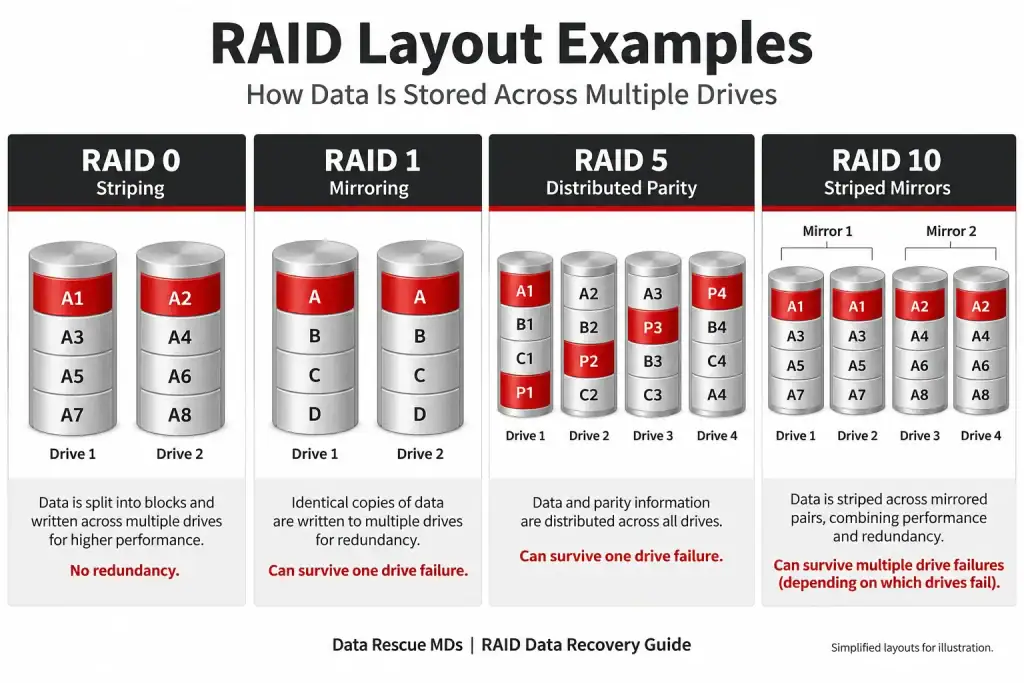
Simplified RAID layouts showing how striping, mirroring, and parity distribute data across drives.
RAID Architectures Explained
RAID 0 – Striping
RAID 0 prioritizes performance and full capacity utilization. Data is striped across two or more drives with no mirror or parity. Because every file may span multiple members, failure of a single drive can make the entire volume inaccessible. Recovery depends heavily on obtaining readable images of every member and reconstructing the original stripe geometry.
RAID 1 – Mirroring
RAID 1 writes identical copies of data to two or more drives. It provides straightforward protection against a single member failure, but it does not protect against deletion, ransomware, filesystem corruption, or both mirrored members failing. Recovery may involve identifying the most complete member, resolving mirror inconsistency, or repairing the logical filesystem.
RAID 5 – Distributed Parity
RAID 5 balances storage efficiency, performance, and redundancy by striping data and distributing parity across all members. It normally tolerates one failed drive. Recovery becomes more complex when another member is unstable, the array has attempted an unsuccessful rebuild, or parity/metadata has been damaged.
RAID 6 – Dual Parity
RAID 6 extends parity protection by maintaining two independent parity calculations. It can normally tolerate up to two failed members, making it useful for larger arrays with longer rebuild times. Recovery may require reconstructing dual-parity relationships and stabilizing multiple degraded drives before logical assembly.
RAID 10 – Striped Mirrors
RAID 10 combines mirrored pairs with striping. It offers strong performance and redundancy, but fault tolerance depends on which members fail. Multiple failures can be tolerated when surviving members preserve each mirror set; losing both members of the same mirror can make the array inaccessible.
JBOD
JBOD is not a traditional RAID level. Drives may operate independently or be concatenated into one logical volume. There is typically no parity or mirroring. In a concatenated configuration, files or filesystem structures may span multiple disks, making drive order and volume mapping important during recovery.
Apple Fusion Drive
Apple Fusion Drive combines SSD and HDD storage into one logical volume and automatically moves data between tiers. It does not provide RAID-style redundancy. Failure of either storage component or the logical metadata joining them can make the volume inaccessible.
Intel Optane
Intel Optane acceleration typically pairs Optane memory with another storage device (on the same SSD) through Intel Rapid Storage Technology. The paired devices operate as one logical storage arrangement rather than a fault-tolerant RAID. Loss of either component or its metadata can prevent normal access.
Drobo BeyondRAID
Drobo BeyondRAID is a proprietary storage architecture designed to simplify expansion and support mixed drive capacities. It can provide single- or dual-drive redundancy, depending on configuration. Recovery often requires interpreting proprietary metadata and reconstructing the BeyondRAID layout independently of the original appliance.
RAID Comparison Table
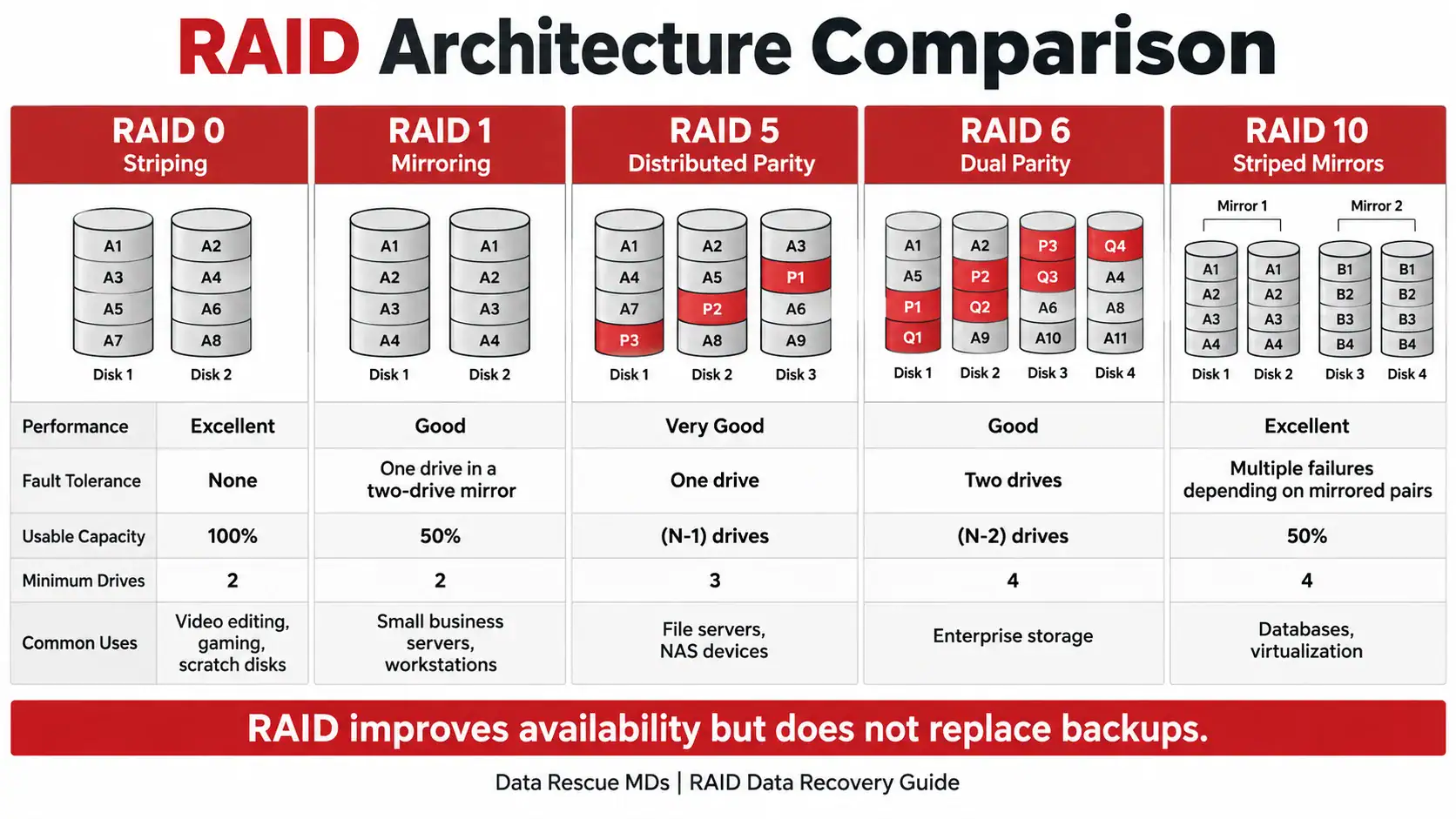
RAID architecture comparison for performance, fault tolerance, usable capacity, minimum drives, and common uses.
RAID 0
Min. Drives: 2
Performance: Excellent
Fault Tolerance: None
Usable Capacity: 100%
Typical Use: Video editing, scratch storage
RAID 1
Min. Drives: 2
Performance: Good
Fault Tolerance: 1 drive in a 2-drive mirror
Usable Capacity: 50%
Typical Use: Workstations, small servers
RAID 5
Min. Drives: 3
Performance: Very Good
Fault Tolerance: 1 drive
Usable Capacity: (N-1) drives
Typical Use: File servers, NAS
RAID 6
Min. Drives: 4
Performance: Good
Fault Tolerance: 2 drives
Usable Capacity: (N-2) drives
Typical Use: Large / enterprise arrays
RAID 10
Min. Drives: 4
Performance: Excellent
Fault Tolerance: Depends on failed mirror members
Usable Capacity: 50%
Typical Use: Databases, virtualization
JBOD
Min. Drives: 1+
Performance: Variable
Fault Tolerance: None
Usable Capacity: 100%
Typical Use: Independent / concatenated storage
Fusion Drive
Min. Drives: 2
Performance: Good
Fault Tolerance: None
Usable Capacity: Combined capacity
Typical Use: macOS hybrid storage
Intel Optane
Min. Drives: Paired devices
Performance: Very Good
Fault Tolerance: None
Usable Capacity: Configuration-dependent
Typical Use: Accelerated Windows storage
BeyondRAID
Min. Drives: 2+
Performance: Very Good
Fault Tolerance: Configurable
Usable Capacity: Flexible
Typical Use: Drobo appliances
Common RAID Failure Scenarios
Hard Drive or SSD Failure
Mechanical HDD failures, unstable sectors, SSD controller failure, firmware corruption, NAND degradation, or electronic damage can cause a member to drop offline or become unreadable.
RAID Controller Failure
The drives may be healthy while a failed controller, cache module, motherboard, or firmware problem prevents the array from assembling normally.
Corrupted RAID Metadata
Power loss, firmware bugs, interrupted changes, accidental initialization, or controller problems can damage the configuration information required to identify the array.
Failed RAID Rebuild
A rebuild places sustained read activity on the surviving members. If another drive is unstable or contains unreadable sectors, the rebuild may stall, fail, or write an incomplete reconstruction.
Multiple Drive Failures
RAID protection is limited by the architecture. When the number or combination of failed members exceeds that tolerance, professional data recovery may require stabilizing one or more failed drives before the logical array can be reconstructed.
Power and Environmental Events
Power outages, surges, overheating, water exposure, or fire can damage several parts of the system at once, including drives, controller electronics, cache state, and filesystems.
NAS / Server Hardware Failure
Backplanes, power supplies, enclosures, motherboards, or network hardware can fail even when the RAID member drives remain healthy.
Human Error
Initializing the wrong array, replacing the wrong drive, moving members out of order, formatting the volume, or attempting multiple rebuilds can overwrite valuable metadata and complicate recovery or make recovery impossible.
What NOT To Do After a RAID Failure
The actions taken immediately after a RAID failure can affect recoverability. If the data is important, avoid changes that write to the array until the cause of the failure is understood.
- Do not initialize or recreate the array if the controller reports it as missing, foreign, or unconfigured.
- Do not force a rebuild until the failed member has been identified and the remaining drives are known to be healthy.
Rebuild attempts may corrupt RAID metadata. The best opportunity to recover the RAID volume is before a rebuild attempt.
- Do not change drive order. Label every drive by its original slot or bay before removing it.
- Do not run CHKDSK, filesystem repair, or other write-intensive utilities against an unstable RAID.
- Do not repeatedly restart a clicking, dropping, or erroring hard drive.
- Do not replace multiple drives or discard members that the controller marked failed; they may contain critical reconstruction data.
- Do not continue writing new data to a degraded array when the information is important and not safely backed up.
When to Call a Professional
Professional RAID evaluation is strongly recommended when two or more members have failed, are missing, or are unstable; before a rebuild has been attempted; if a drive is clicking or repeatedly dropping offline; the controller reports foreign or missing configuration; the NAS/server will not mount after a power event or hardware change; or the data is business-critical, regulated, irreplaceable, or not safely backed up. The safest time to involve a professional data recovery firm is before additional writes are made to the array.
Professional RAID Data Recovery Process
1. Free Evaluation
The RAID configuration, member drives, controller or NAS hardware, failure history, and visible symptoms are evaluated to determine the likely failure path and the safest recovery strategy.
2. Protect the Original Media
Whenever practical, member devices are imaged sector by sector, in write-blocking hardware systems, so reconstruction can proceed from controlled working copies rather than the original media.
3. Hardware and Firmware Diagnostics
Failing HDDs, SSDs, electronics, firmware, and communication problems are stabilized as required before extensive data recovery is attempted.
4. Virtual RAID Reconstruction
Engineers determine RAID level, disk order, stripe/chunk size, offsets, parity behavior, and other parameters, then reconstruct the array virtually, never writing changes or manipulating the source drives.
5. Filesystem Analysis
The reconstructed logical volume is analyzed for filesystem corruption, damaged directories, deleted metadata, and incomplete transactions.
6. File Verification
Automated recovered file verification is conducted whenever possible to confirm usability and organization of data after the data recovery process has been completed.
7. Secure Data Return
Recovered data is transferred to appropriate destination media and returned to the client according to the approved recovery case.
Need RAID Data Recovery?
If your RAID array is degraded, offline, reporting failed drives, or has experienced an unsuccessful rebuild, stop making changes and contact Data Rescue MDs. Free evaluation. Flat-rate pricing. No Data – No Fee.
Call 847-461-3282 or start your recovery online.
Frequently Asked Questions
Can RAID data be recovered?
In most cases, yes. Recoverability depends on the RAID architecture, the condition of each member, the amount of missing or overwritten data, the filesystem, and what changes were made after the failure. The best opportunity for recovery is when the client has refrained from “rebuilding” or ad hoc recovery methods that may corrupt or destroy the RAID metadata.
Can RAID 0 be recovered after one drive fails?
Sometimes. RAID 0 contains no redundant copy or parity, so recovery depends heavily on obtaining readable data from every member. Severe unrecoverable damage to one drive may adversely affect the recovery quality.
Can RAID 5 be recovered after two drives fail?
Possibly, but RAID 5 itself does not tolerate two missing members. Recovery depends on whether the most recently failed or unstable drive of the two can be stabilized and imaged sufficiently to reconstruct the array.
What if a RAID rebuild already failed?
A failed rebuild does not automatically eliminate recovery options. Stop further rebuild attempts and preserve every original member, including drives that were removed or marked failed.
Can a failed RAID controller be replaced?
Sometimes, but controller family, firmware, cache state, metadata behavior, and import procedures can matter. If the data is critical, evaluation before experimenting with replacement hardware is safer. A small configuration mismatch can destroy critical RAID metadata needed for data recovery.
Can you recover SSD-based RAID arrays?
Yes. SSD RAID cases may require controller, firmware, or NAND-level stabilization of failed members followed by logical RAID reconstruction.
Can you recover NAS devices?
Yes. NAS recovery can involve RAID reconstruction, Linux or proprietary filesystems, enclosure/controller failures, unsuccessful rebuilds, and multiple failed drives.
How long does RAID recovery take?
Turnaround depends on the number and capacity of the drives, the failure condition of the media, the complexity of recovery processes required for the failed members, the RAID architecture, and the amount of imaging and reconstruction required. Expedited options may be available for urgent cases.
Should I rebuild a degraded RAID before sending it in?
No. STOP! If the data is critical and the reason for degradation is uncertain, refrain from all ad hoc recovery methods. Rebuilding is appropriate only when the failure is understood, and the remaining members are healthy enough to support it.
Is RAID a backup?
No. RAID provides availability and fault tolerance under defined conditions. Important data should also exist in a separate, verified, versioned backup.
Need RAID Data Recovery?
If your RAID array is degraded, offline, reporting failed drives, or has experienced an unsuccessful rebuild, stop making changes and contact Data Rescue MDs. Free evaluation. Flat-rate pricing. No Data – No Fee.
Call 847-461-3282 or start your recovery online.
Frequently Asked Questions
Can RAID data be recovered?
In most cases, yes. Recoverability depends on the RAID architecture, the condition of each member, the amount of missing or overwritten data, the filesystem, and what changes were made after the failure. The best opportunity for recovery is when the client has refrained from “rebuilding” or ad hoc recovery methods that may corrupt or destroy the RAID metadata.
Can RAID 0 be recovered after one drive fails?
Sometimes. RAID 0 contains no redundant copy or parity, so recovery depends heavily on obtaining readable data from every member. Severe unrecoverable damage to one drive may adversely affect the recovery quality.
Can RAID 5 be recovered after two drives fail?
Possibly, but RAID 5 itself does not tolerate two missing members. Recovery depends on whether the most recently failed or unstable drive of the two can be stabilized and imaged sufficiently to reconstruct the array.
What if a RAID rebuild already failed?
A failed rebuild does not automatically eliminate recovery options. Stop further rebuild attempts and preserve every original member, including drives that were removed or marked failed.
Can a failed RAID controller be replaced?
Sometimes, but controller family, firmware, cache state, metadata behavior, and import procedures can matter. If the data is critical, evaluation before experimenting with replacement hardware is safer. A small configuration mismatch can destroy critical RAID metadata needed for data recovery.
Can you recover SSD-based RAID arrays?
Yes. SSD RAID cases may require controller, firmware, or NAND-level stabilization of failed members followed by logical RAID reconstruction.
Can you recover NAS devices?
Yes. NAS recovery can involve RAID reconstruction, Linux or proprietary filesystems, enclosure/controller failures, unsuccessful rebuilds, and multiple failed drives.
How long does RAID recovery take?
Turnaround depends on the number and capacity of the drives, the failure condition of the media, the complexity of recovery processes required for the failed members, the RAID architecture, and the amount of imaging and reconstruction required. Expedited options may be available for urgent cases.
Should I rebuild a degraded RAID before sending it in?
No. STOP! If the data is critical and the reason for degradation is uncertain, refrain from all ad hoc recovery methods. Rebuilding is appropriate only when the failure is understood, and the remaining members are healthy enough to support it.
Is RAID a backup?
No. RAID provides availability and fault tolerance under defined conditions. Important data should also exist in a separate, verified, versioned backup.
How to Prevent Data Loss
Keeping at least one additional copy of your critical data reduces the potential catastrophe of data loss related to media damage. A better alternative is three copies: the original data, a second copy on an alternative data storage device, and a third copy in a geographically diverse and secure location, such as a safe deposit box or secure cloud storage.
This three-copy policy is known as a 3-2-1 data resilience strategy and may protect your data from common causes of data loss such as hardware failure or damage, natural disasters, theft, and malware. Because computer viruses and malware can affect data integrity within individual and RAID storage devices connected to a single computer or shared storage network, a 3-2-1-1-0 data resilience strategy is now recommended to protect critical data. The 3-2-1-1-0 data resilience strategy is covered in an alternative blog post.
Why Choose Data Rescue MDs for RAID Data Recovery?
When a RAID system fails, the safest recovery begins with diagnosis rather than assumptions. Data Rescue MDs evaluates the storage environment as a complete system: physical media, controller behavior, RAID metadata, filesystem, and the sequence of events leading to failure. Our goal is to preserve the original media, identify the actual failure, and use the safest, highest-probability recovery path available.
Data Rescue MDs offers free evaluations, transparent flat-rate pricing, a No Data – No Fee policy for unsuccessful recoveries under the approved service agreement, RAID/NAS/server expertise, HDD and SSD engineering capabilities, an ISO-compliant cleanroom for applicable mechanical failures, HIPAA certification for secure handling of sensitive information, complimentary shipping options, and expedited recovery when minimizing downtime is critical.
If your RAID is degraded, offline, reporting failed members, or has already experienced an unsuccessful rebuild, avoid additional changes until the failure has been evaluated. Contact Data Rescue MDs for a free RAID data recovery evaluation at 847-461-3282.
Start Your RAID Data Recovery Today
Free evaluation. Flat-rate pricing. No Data – No Fee. Call 847-461-3282 or start your recovery online.