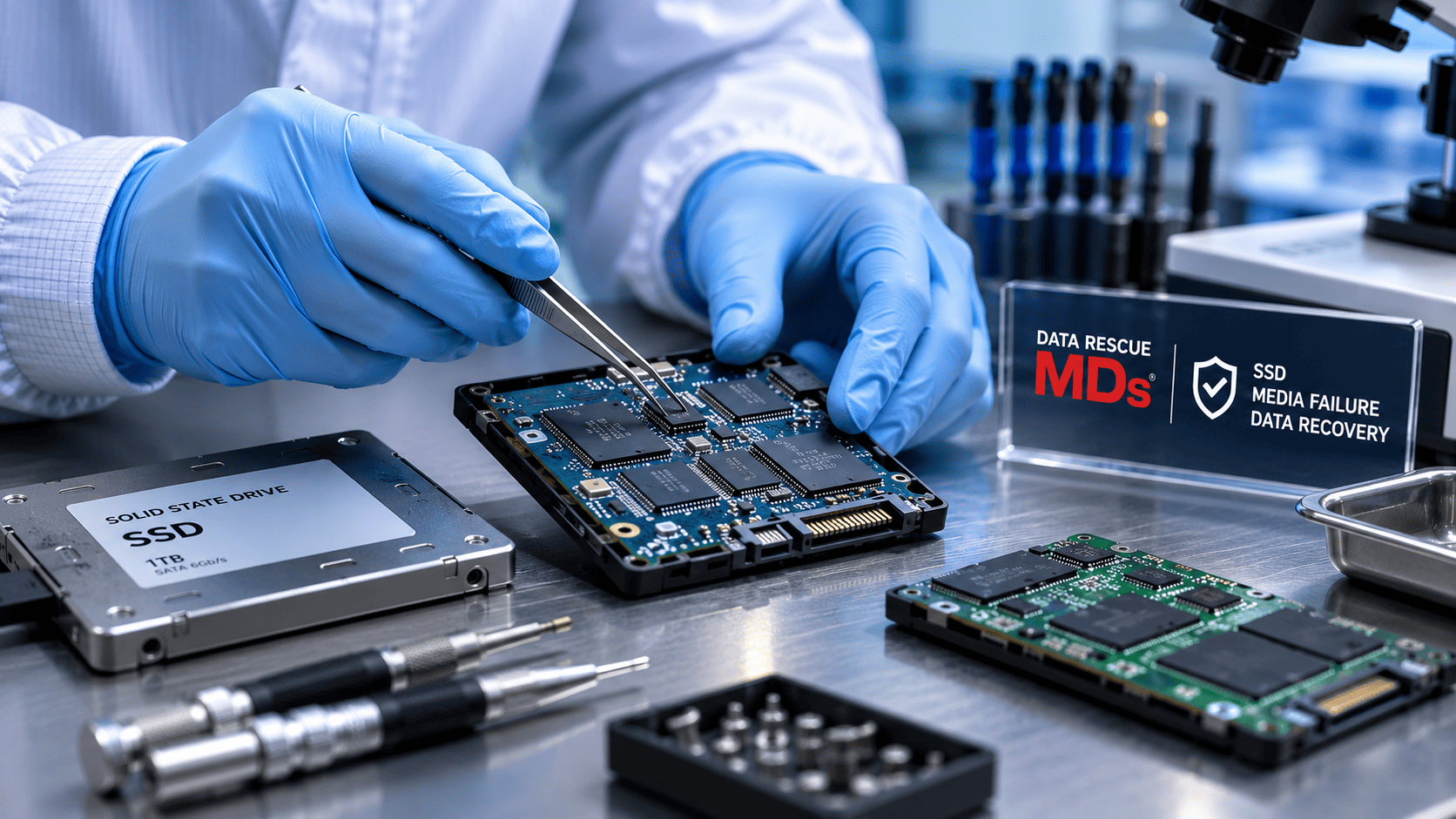

Solid-state drives (SSDs) are fast, compact, and resistant to many mechanical problems associated with traditional spinning hard drives. They are not permanent storage devices, however, and they are not immune to failure. At Data Rescue MDs, we regularly evaluate solid-state storage devices that suddenly disappear, become read-only, stop during a file transfer, enter a boot loop, report the wrong capacity, or can no longer be accessed by the computer, camera, mobile device, NAS, or RAID system that depends on them.
Unlike an electro-mechanical hard drive, an SSD has no spinning platters or moving read/write heads. It stores data electronically in NAND flash memory. A controller, firmware, power-management circuitry, error-correction systems, and a continuously changing translation map work together to locate and retrieve that data. A failure in any part of this system can make the SSD inaccessible with little or no warning.
This article explains the common signs of SSD failure, how NAND flash memory becomes unreliable, why modern SSD architectures make recovery complex, and what to do when an SSD is no longer detected or becomes unstable.
Solid-State Storage Devices Covered in This Discussion
The same core NAND-based storage principles apply across many devices, although controllers, interfaces, firmware, encryption, and physical construction differ. Examples include:
- Internal and external SATA SSDs
- NVMe/PCIe SSDs
- mSATA and M.2 SSDs
- SAS and enterprise solid-state drives
- Apple and other proprietary or embedded SSDs
- USB flash drives
- SD and microSD cards
- CompactFlash, CFast, CFexpress, and XQD cards
- Embedded flash storage used in mobile devices, cameras, and specialized equipment
- Solid-state drives installed in RAID arrays, NAS appliances, servers, and storage systems
Common Signs of a Failing or Failed SSD
A failing SSD may provide no mechanical warning. Because it has no moving parts, it generally does not click, screech, or beep. Warning signs instead appear as changes in access, speed, stability, capacity, or system behavior.
The SSD Disappears or Is Not Detected
The drive is missing from the operating system, Disk Management, Disk Utility, BIOS, UEFI, camera, mobile device, NAS, or RAID controller. It may appear intermittently and then vanish again.
The Device Becomes Read-Only
Some SSDs enter a protective read-only condition when the controller determines that continued writes may cause further corruption. Existing files may still open, but changes cannot be saved, and new files cannot be written.
File Transfers Stall or the Device Disconnects
Copy operations may slow dramatically, stop at a certain percentage, freeze the operating system, or cause the SSD to unmount or eject.
Files or Folders Disappear
Data may appear missing, return after a restart, or produce errors such as file not found, corrupt file, bad block, or the device must be formatted before use.
Boot Loops and Startup Failures
Windows may display No Bootable Device, a blue screen, or repeated restarts. A Mac may show a question-mark folder, a prohibited symbol, a spinning beach ball, or repeated rebooting. Mobile devices may remain on a manufacturer logo or restart continuously.
The Drive Reports the Wrong Capacity
A failed controller or corrupted firmware may cause an SSD to report zero bytes, an incorrect capacity, an unfamiliar model name, or a limited diagnostic or safe mode.
Sudden Slowness, Freezing, or Application Crashes
The system may take unusually long to boot, pause during ordinary use, or experience repeated crashes as the SSD retries unreadable areas or struggles with internal error correction.
What Causes SSD Failure?
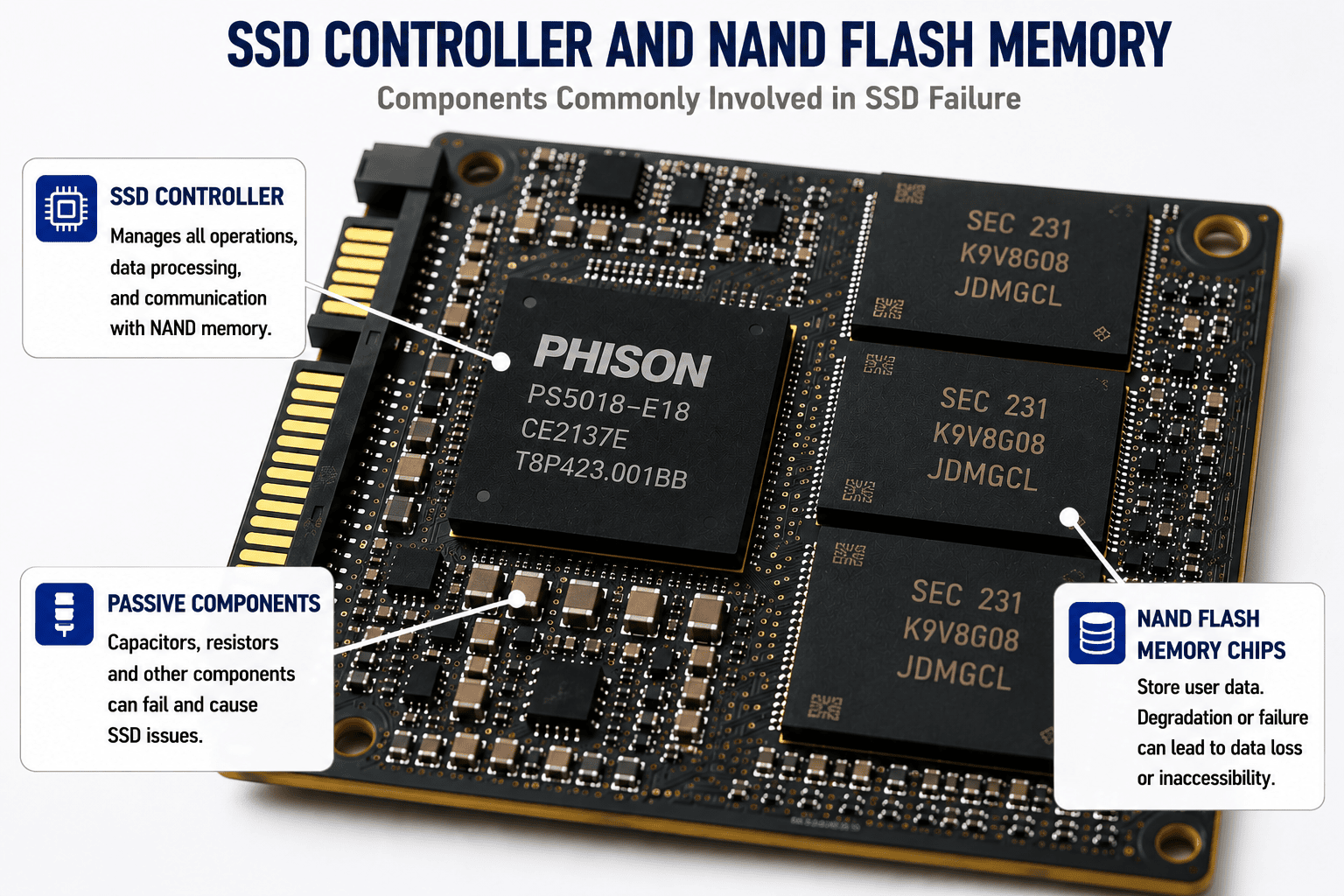
An SSD is a coordinated electronic system. NAND flash stores the data, but the controller and firmware determine how that data is written, moved, corrected, encrypted, and retrieved. A fault in one subsystem can make the entire device appear dead even when much of the user data remains physically present in NAND memory.
Protective Circuit or Power Failure
Power surges, unstable power, liquid exposure, failed power-management components, shorted capacitors, damaged connectors, or incorrect voltage can prevent the controller and NAND from initializing. A visible burn mark is not required; many electrical failures are microscopic or internal to the components.
SSD Controller Failure
The controller is the central processor of the SSD. It manages host communication, NAND access, wear leveling, error correction, bad-block management, encryption, garbage collection, and the Flash Translation Layer. If the controller fails, the SSD may disappear, report an incorrect identity or capacity, or remain stuck in a diagnostic state.
Firmware Corruption
Controller firmware contains the operating logic required to initialize the SSD and manage its NAND memory. Corruption can result from interrupted writes, internal defects, failed updates, degraded firmware storage areas, or component faults. Firmware failure can block normal access even when the NAND chips remain electrically functional.
Flash Translation Layer Corruption
The Flash Translation Layer (FTL) maps the logical addresses used by the computer to physical pages and blocks inside the NAND storage. Because data is continually relocated during wear leveling, garbage collection, and bad-block replacement, the map changes over time. If critical translation metadata is damaged, the SSD may no longer be able to locate user data correctly.
NAND Flash Degradation or Failure
NAND cells have finite endurance and gradually lose the ability to maintain charge states reliably. As program/erase cycles accumulate and the memory ages, bit-error rates rise. The controller compensates with error correction, spare blocks, read-retry techniques, and background management. Data becomes corrupted or inaccessible when errors exceed the device’s ability to correct or relocate them.
Heat and Environmental Damage
Excessive heat can accelerate electronic aging and reduce data-retention margins. Liquid, corrosion, impact, flexing, fire, and contamination can damage the board, solder joints, packages, or embedded components.
Manufacturing Defects and Component Aging
Some SSDs fail early because of a defective controller, NAND package, solder connection, passive component, or firmware issue. Others fail after years of service as components age and operating margins narrow.
Logical Damage and File-System Corruption
Not every inaccessible SSD has a physical failure. Unsafe removal, operating-system crashes, malware, accidental formatting, partition damage, and file-system corruption can also prevent access. A professional evaluation helps distinguish logical damage from an unstable SSD that should not be scanned conventionally.
How NAND Flash Memory Stores Data
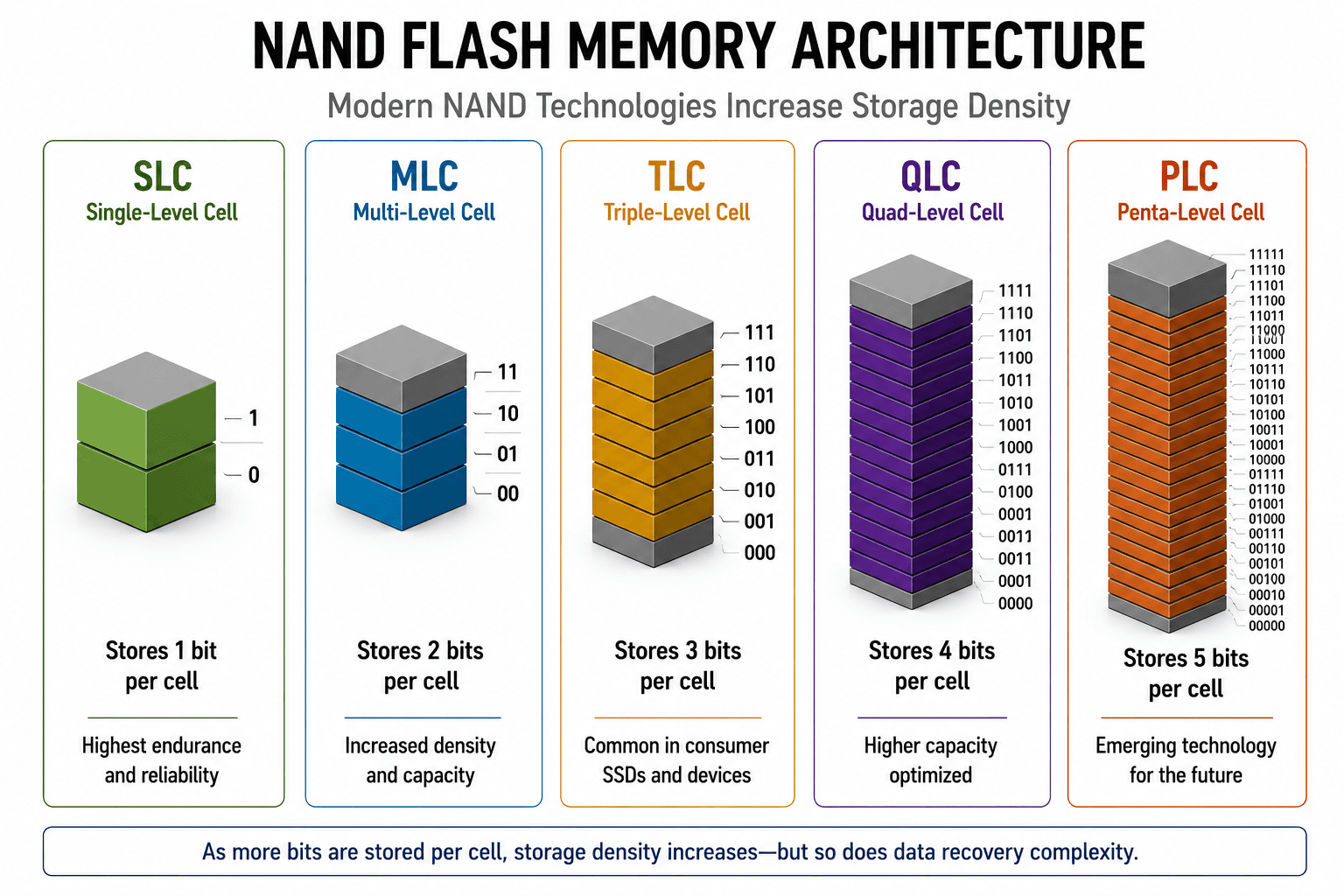
NAND flash stores information by maintaining different electrical charge states inside each memory cell. Increasing the number of states allows more bits to be stored in the same physical cell, improving density and lowering cost per gigabyte. The tradeoff is a narrower electrical margin between states, generally lower endurance, and greater dependence on precise sensing, controller management, and error correction.
| NAND Type | Bits per Cell | Data Rescue MDs Explanation |
|---|---|---|
| SLC – Single-Level Cell | 1 | Stores 1 bit per cell. SLC provides the widest state margin and traditionally offers the highest endurance and reliability, but at higher cost and lower density. |
| MLC – Multi-Level Cell | 2 | Commonly stores 2 bits per cell. It increases density while generally retaining more endurance than higher-bit-per-cell NAND. MLC is commonly used in enterprise SSDs because it offers a practical balance of capacity, cost, performance, and endurance. |
| TLC – Triple-Level Cell | 3 | Stores 3 bits per cell and is widely used in consumer SSDs. TLC provides a good balance between affordability, storage capacity, and performance, though it has lower endurance than SLC and MLC. |
| QLC – Quad-Level Cell | 4 | Stores 4 bits per cell. QLC increases density and capacity but generally has narrower state margins and lower program/erase endurance than TLC. It is best suited for read-heavy workloads and cost-effective high-capacity storage. |
| PLC – Penta-Level Cell | 5 | Designed to store 5 bits per cell. PLC requires even more precise programming, sensing, and error correction. It remains an emerging technology and is not yet common in commercial SSD products. |
Higher density does not mean that an SSD is destined to fail. A well-designed SSD may provide years of reliable service. However, when cell degradation, retention loss, or read errors exceed the controller’s correction capability, data can become corrupted or inaccessible quickly.
Why SSDs Move Data Internally
NAND flash devices cannot overwrite individual pages in place. Data is written in pages but erased in larger blocks. To update data efficiently and distribute wear, the controller writes revised data to new locations, marks old pages invalid, and later consolidates valid pages through garbage collection. Wear leveling distributes program/erase activity so that a small area does not wear out prematurely.
This movement is invisible to the operating system. The computer sees logical sectors, while the controller tracks changing physical locations. That is why reconstructing a failed SSD requires far more than reading NAND chips in simple sequence.
NAND Die Stacking and Chip-Enable Architecture
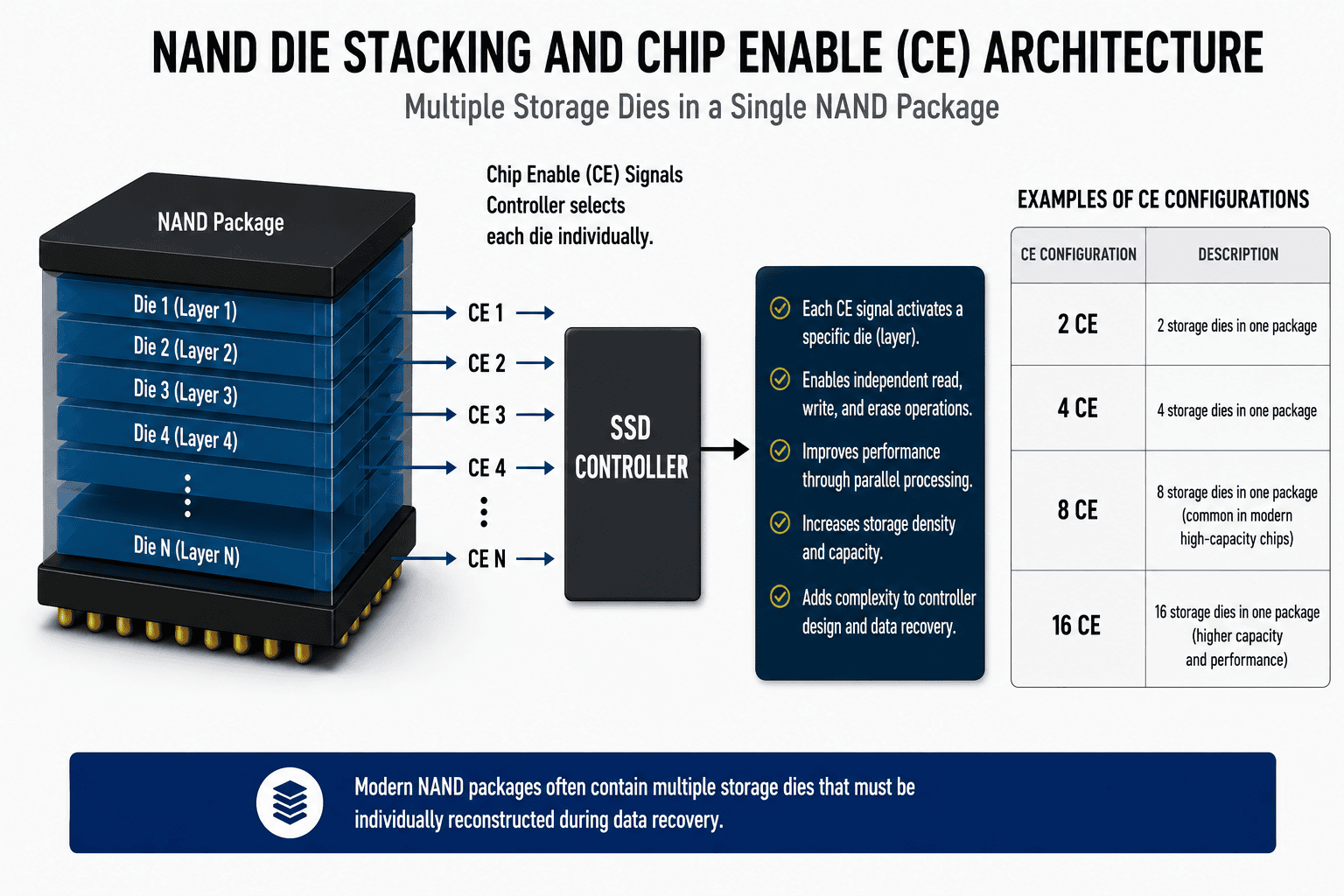
Modern NAND packages often contain multiple physical silicon dies stacked inside one package. These dies function like separate memory devices that share a package and data bus. The controller uses chip-enable signals, often abbreviated CE, to select the die it needs to access.
- A NAND package may contain 2, 4, 8, 16, or more dies, depending on design and capacity.
- The chip-enable arrangement allows the controller to select individual dies within the package.
- The controller may interleave operations across dies, improving throughput by working with one die while another is busy.
- More dies increase capacity but also add complexity to addressing, interleaving, error correction, data layout, and recovery.
- A designation such as 8 CE describes a controller arrangement for addressing multiple NAND dies; it does not describe ordinary files, partitions, or user-accessible volumes.
Why NAND-Level SSD Recovery Is Complex
When normal controller access is impossible, certain devices may require direct NAND acquisition or chip-off recovery. This is not a simple chip-reading process. Raw NAND dumps may contain user pages, spare areas, error-correction data, scrambling, interleaving, XOR patterns, bad-block markers, and controller-specific metadata.
- Acquire data from each accessible die or NAND package without introducing additional damage.
- Determine page, block, plane, die, channel, and interleave organization.
- Correct bit errors using ECC or LDPC-related processing supported by the recovery platform.
- Reverse supported controller-specific scrambling, XOR, data mixing, and virtual-page arrangements.
- Reconstruct the Flash Translation Layer and logical block order.
- Account for bad blocks, substituted blocks, wear-leveling history, garbage collection, and missing or degraded pages.
- Address hardware or platform encryption when the required keys and controller relationships can be preserved or reconstructed.
Controller designs, firmware, NAND configurations, and encryption vary widely. A method that works for one SSD model may not apply to another, so the recovery approach must be selected for the specific device and failure mode.
TRIM, Garbage Collection, and Deleted Data
TRIM allows an operating system to notify an SSD that certain logical blocks are no longer needed after files are deleted or a volume is formatted. The SSD may later erase or recycle the associated NAND pages during garbage collection. These processes improve performance and write efficiency, but they can sharply reduce the possibility of recovering deleted data once the mapping has been removed or the underlying pages have been erased.
TRIM does not mean that every failed SSD is unrecoverable. Hardware, controller, firmware, electrical, and NAND failures are different from ordinary deletion. Recoverability depends on the SSD, operating system, file system, encryption, TRIM status, garbage-collection activity, power-on time, and the nature of the failure.
SSDs in RAID, NAS, and Server Storage
SSDs are increasingly used in RAID arrays, NAS appliances, servers, cache tiers, and high-performance storage systems. Recovery may require two separate stages: first stabilizing and imaging the failed SSD members, then reconstructing the RAID or storage configuration.
Do not rebuild a degraded array, initialize replacement drives, force failed members online, or allow a controller to perform automatic repair before evaluation. A rebuild writes extensively to the remaining devices and may overwrite metadata or push another marginal SSD into complete failure.
What Not to Do When an SSD Is Failing
- Avoid repeatedly restarting or reconnecting the SSD to see whether it returns.
- Avoid formatting, initializing, repartitioning, or accepting an operating-system repair prompt.
- Avoid running CHKDSK, First Aid, fsck, manufacturer repair tools, or broad recovery scans on an unstable SSD.
- Avoid updating SSD firmware unless a qualified recovery engineer has determined that the procedure is safe for the specific failure.
- Avoid attempting board swaps or moving NAND chips without model-specific expertise. Modern SSDs may depend on adaptive data, unique firmware, encryption keys, and controller-specific relationships.
- Avoid continuing to use a system whose SSD is freezing or disappearing. Intermittent access is not evidence that the device is safe.
What to Do If Your SSD Is Not Detected or Becomes Inaccessible
Power the device off
Disconnect the SSD or shut down the computer, NAS, server, camera, or mobile device. Avoid repeated access attempts.
Document what happened
Note any power event, drop, liquid exposure, error message, recent update, slowdown, or capacity change. This information can help guide the evaluation.
Preserve the original device
Do not open the SSD or alter the board. Keep relevant enclosures, adapters, and cables.
Request a professional evaluation
Data Rescue MDs begins with a free evaluation to identify the failure and determine the safest recovery options. You receive a clear estimate before deciding whether to proceed.
How Professional SSD Data Recovery Works
- Diagnostic evaluation: The device, controller, NAND configuration, encryption environment, electrical condition, and symptoms are identified...
- Electrical and board-level stabilization: Shorts, failed power components, damaged connectors...
- Controller and firmware access: When supported, professional tools may communicate...
- Controlled imaging and error management: The SSD is read in a manner designed...
- NAND-level recovery when required: For supported devices, direct NAND acquisition...
- File-system and data reconstruction: Once a stable image is available...
- Verification and delivery: Recovered data is reviewed according to the case requirements...
Can Data Be Recovered From a Dead SSD?
Often, yes – but not in every case. Recovery may be possible when the failure involves power circuitry, a connector, controller behavior, firmware, translation metadata, limited NAND degradation, or logical corruption. Recovery becomes more difficult or impossible when NAND dies are physically damaged, critical pages are unreadable beyond correction, necessary encryption keys are unavailable, or TRIM and garbage collection have erased the required data.
A free professional evaluation is the most reliable way to determine the condition of the device and the available options. Do not assume an SSD is unrecoverable simply because it is not detected, and do not assume it is safe to scan simply because it appears intermittently.
How to Reduce the Risk of SSD Data Loss
- Maintain current backups instead of relying on a single SSD.
- Use the 3-2-1 backup strategy: keep three copies of important data, on two different types of storage, with one copy off-site or in secure cloud storage.
- For critical business data, consider a 3-2-1-1-0 strategy: add one offline or immutable copy and verify that backups complete with zero errors.
- Use surge protection and a reliable uninterruptible power supply (UPS) for desktops, servers, NAS systems, and externally powered storage.
- Monitor SSD health indicators, error logs, temperature, and remaining-life estimates, while recognizing that health reports cannot predict every sudden failure.
- Replace devices that begin disconnecting, becoming read-only, reporting errors, or showing significant health warnings – after securing and verifying a backup.
- Test backups regularly. A backup that cannot be restored is not reliable.
Why Choose Data Rescue MDs for SSD Data Recovery?
- Free diagnostic evaluation and a clear recovery estimate
- Advanced solid-state diagnostics and professional recovery tools and processes
- Experience with SSD, NVMe, flash media, RAID/NAS, mobile, Mac, Windows, Linux, and embedded storage
- Board-level diagnostics, micro-soldering, controller and firmware methods, and chip-off recovery when appropriate
- Secure handling by experienced data recovery professionals
- Expedited service options for time-sensitive cases
- No Data, No Recovery Fee policy for unsuccessful recoveries, subject to the approved service agreement
Frequently Asked Questions About SSD Failure and Data Recovery
Why is my SSD not detected?
An SSD may not be detected because of a failed power circuit, damaged connector, controller failure, firmware corruption, translation-layer damage, NAND degradation, enclosure or cable failure, or a host-system issue. An evaluation can determine whether the problem is inside the SSD or elsewhere in the system.
Can data be recovered from an SSD that is not recognized?
Yes, recovery is often possible depending on the model and failure. Electrical repair, specialized controller access, firmware methods, controlled imaging, or NAND-level techniques may provide access. Severe NAND damage, encryption, or erased data can limit recovery.
Does an SSD make clicking noises when it fails?
Generally, no. SSDs have no spinning platters or moving read/write heads. Most failures appear as disconnection, non-detection, read-only behavior, slowness, freezing, wrong capacity, or boot failure. A pop or burnt odor can occur during an electrical failure, but this is uncommon.
Should I run data recovery software on a failing SSD?
Not when the SSD is freezing, disappearing, reporting read errors, becoming read-only, or showing the wrong capacity. A software scan can keep the device powered and force extensive reads. Software is more appropriate after the hardware is confirmed stable or after a sector-level image has been created.
Can deleted files be recovered from an SSD?
Sometimes, but encryption, TRIM, and garbage collection can make deleted-file recovery unlikely or impossible. Results depend on the operating system, file system, encryption, TRIM status, elapsed power-on time, and whether the relevant NAND pages were erased or reused.
What is NAND flash recovery?
NAND flash recovery is the process of acquiring and reconstructing data stored in flash memory. Advanced cases may involve direct NAND acquisition, error correction, de-scrambling, interleave reconstruction, bad-block processing, and translation-layer rebuilding.
Can you recover data from an NVMe SSD?
Yes, many NVMe SSD failures are recoverable. NVMe defines how host software communicates with non-volatile storage; the device still contains a controller, firmware, power circuitry, and NAND memory. Recovery options depend on the controller, encryption, physical design, and failure mode.
Can SSD data be recovered after a power surge?
Often, yes. A surge may damage protective or power-management circuitry while leaving NAND data intact. Severe electrical damage may also affect the controller or NAND. Do not repeatedly reconnect the SSD after a suspected surge.
Is chip-off recovery always possible?
No. NAND may be embedded, encrypted, physically damaged, or unsupported by available decoding methods. In other cases, raw NAND can be acquired but the controller-specific translation or encryption cannot be reconstructed completely. Chip-off is one possible method, not a universal solution.
How much does SSD data recovery cost?
Cost depends on the device, failure type, capacity, encryption, parts, labor, and recovery method. Data Rescue MDs begins with a free evaluation and provides an estimate before work proceeds. Under the No Data, No Recovery Fee policy, recovery fees are waived when recovery is unsuccessful, subject to the service agreement.